Installing IomegaWare™
Software
Installing IomegaWare™
software installs the drivers and tools your computer
needs to support Iomega drives, including the Zip®
drive.
-
Start your PC and wait for Windows®
to finish loading.
NOTE: If Windows®
is already running, close all applications before
proceeding.
-
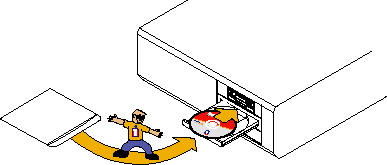
Insert the IomegaWare™
CD into the computer's CD-ROM drive.
-
If the IomegaWare™
setup program does not start automatically, follow
these steps:
-
Open My Computer or Windows® Explorer.
-
Double click the CD drive letter (usually D:,
E:, or F:).
-
Double click Setup.
-
Follow the instructions on the screen to install
the software.
-
Connect your Zip Parallel
Port drive
| top
of page |
Using IomegaWare™
Software
You can use IomegaWare™
software to format, copy, and protect your Zip®
disks. For users with Windows®
95/98, IomegaWare software also includes a drive letter
manager feature that makes it easy to change the drive
letter assigned to your Zip®
drive and other removable drives on your system.
After you install the software, you can find information
on using IomegaWare™
software in the help files available on your system.
IomegaWare™
software includes complete help information in HTML
format. You can access IomegaWare help by following
these instructions:
-
Right click the Zip®
drive icon in My Computer or Windows® Explorer.
-
Select Properties.
-
Click the tab for Iomega.
-
Click the Help button.
How to Install Without
a CD-ROM Drive
If you need to install or use your Zip®
drive on a computer that does not have a CD-ROM drive,
you can download IomegaWare™
software from the Internet. You can also download Iomega
software applications that are available from the Iomega
web site.
-
Contact the Iomega web site at http://www.iomega.com.
-
Click Software Download to find the Iomega
software for your system.
| top
| home
| previous
| next
|